

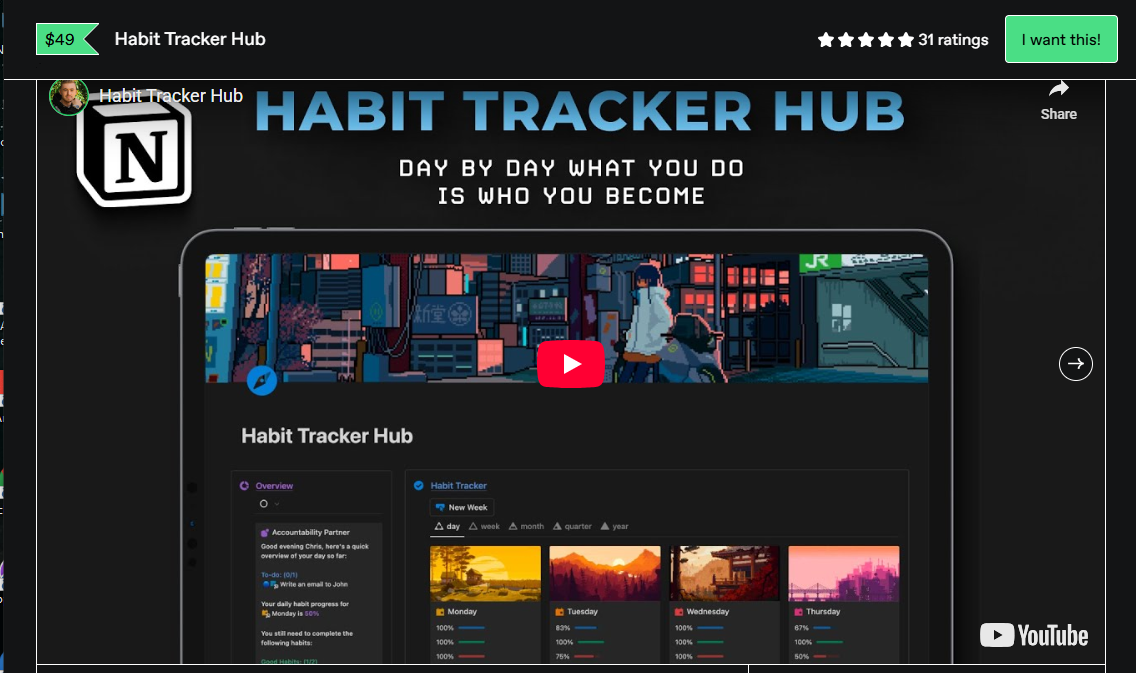

Transform Your Daily Routines: An In-Depth Look at Chris Punt – Habit Tracker Hub
Maintaining momentum toward personal and professional goals often comes down to consistency rather than sheer willpower. While dozens of applications promise to streamline daily organization, many fall short by introducing unnecessary friction or overly complicated interfaces. digital productivity systems designed within flexible platforms like Notion have gained significant traction for good reason. Among these tools, the system developed by Chris Punt stands out as a dedicated framework designed to bridge the gap between setting ambitious goals and executing daily actions.
Whether you are trying to build morning routines, track health metrics, master new skills, or simply curb distracting habits, having a centralized dashboard makes all the difference. This review provides a comprehensive breakdown of what makes this particular workspace effective, how it structures behavioral change, and whether it deserves a permanent spot in your digital ecosystem.
The Philosophy Behind Effective Habit Building
Most habit trackers act as simple checklists: you mark a box, feel a brief surge of dopamine, and move on. However, lasting behavioral change requires more than superficial checkmarks. It demands reflection, visualization, and a clear link between micro-actions and macro-objectives.
The core architecture of the system created by Chris Punt relies on proven behavioral science principles. By combining visual progress meters, historical logs, and structured weekly reviews, it helps users move from passive intention to active execution. Instead of overwhelming you with endless setup requirements, the workspace establishes an intuitive hierarchy:
-
Identity-Level Goals: Defining who you want to become rather than just what you want to check off.
-
Daily Action Triggers: Clearly defined micro-steps that require minimal activation energy.
-
Progress Visualization: Instant visual feedback through completion bars and streak counts.
-
Weekly Reflections: A structured space to assess what worked, what failed, and how to adjust.
Core Features and Workspace Layout
Upon opening the template, the first thing you notice is the minimal, distraction-free aesthetic. Instead of cluttering the main screen with dense databases, the layout prioritizes immediate clarity. You are greeted with today’s priorities, visual progress indicators, and easy access to historical data.
+-----------------------------------------------------------------------+
|                         DAILY DASHBOARD OVERVIEW                       |
+-----------------------------------------------------------------------+
|  [ Today's Focus ]        [ Progress Ring / % ]    [ Current Streaks ] |
|  - Morning Routine        ■■■■■■■■□□ 80%           - Workout: 14 Days   |
|  - Deep Work Session                               - Reading: 21 Days   |
+-----------------------------------------------------------------------+
|                              NAVIGATION                               |
|  [ Daily Log ]   [ Weekly Review ]   [ Analytics ]   [ Master Archive ] |
+-----------------------------------------------------------------------+
1. The Daily Dashboard
The central command center is designed to be visited twice a day: once in the morning to set intentions and once in the evening to log progress. It filters out irrelevant past records, displaying only the active day’s checklist. This removes cognitive overload and allows you to focus purely on the tasks at hand.
2. Automated Progress Metrics
One of the key strengths of this Notion setup is how seamlessly it calculates performance statistics. As you mark items as completed, relation properties and formulas automatically calculate your daily score percentage. Watching a progress bar fill up in real time provides an immediate psychological reward, reinforcing positive behavior.
3. Comprehensive Analytics & Streak Tracking
Consistency thrives on visual feedback. The template tracks active streaks, displaying how many consecutive days you have successfully completed a given action. Crucially, it also tracks overall completion rates over weeks and months, ensuring that a single missed day doesn’t feel like total failure.
Detailed Breakdown of System Modules
To understand why this digital resource is so popular, it helps to examine its key modules and how they interact with one another.
How to Set Up and Customize Your Dashboard
Getting started with a new Notion system can sometimes feel daunting, but the setup process here is remarkably straightforward.
Step 1: Define Core Focus Areas
Before populating your database, categorize your goals into key life domains such as Fitness, Professional Growth, Mindfulness, or Finance. Grouping your habits prevents your dashboard from becoming an overwhelming wall of tasks.
Step 2: Establish Realistic Daily Benchmarks
Avoid the common trap of adding twenty new habits on day one. Start with three to five non-negotiable actions. Make them specific and measurable (e.g., “Read 10 pages” instead of “Read more”).
Step 3: Implement the Morning & Evening Trigger System
Integrate the tracker into your existing physical environment. Open your Notion dashboard at the exact same time every morning alongside your coffee, or conduct your evening review right before turning off your computer for the night.
Strengths and Potential Drawbacks
No digital tool is perfect for every individual. Here is an honest appraisal of where this setup excels and where it might require minor adjustments.
Key Advantages
-
Frictionless Data Entry: Clicking checkboxes in Notion takes seconds, making it easy to maintain the habit of tracking itself.
-
Clean Architectural Design: The workspace uses a clean aesthetic that suppresses unnecessary noise, keeping your focus on action items.
-
Customizable Structure: Because it is built within Notion, you can effortlessly adjust properties, add custom views, or embed additional notes.
-
Focus on Reflections: The inclusion of qualitative journaling sections ensures you are learning from missed targets rather than just feeling guilty.
Points to Consider
-
Requires Notion Usage: If you do not already use Notion as part of your daily workflow, opening a separate app solely for tracking habits can introduce unnecessary friction.
-
Manual Entry: Unlike automated wearable fitness trackers, success relies entirely on manual input and honest self-reporting.
Who Benefits Most From This Setup?
This workspace is ideal for professionals, students, creators, and entrepreneurs who already rely on digital productivity platforms and want a streamlined system to manage personal growth. If you prefer keeping your project management, notes, and daily routines under one unified platform, this workspace offers an exceptional solution.
However, if you prefer mobile-first, single-purpose apps with push notifications and automated phone integration, a dedicated native smartphone app might suit your style better. For Notion enthusiasts, this dashboard delivers everything necessary to turn abstract goals into daily realities.
Final Verdict
The system designed by Chris Punt delivers a refined, thoughtful balance between structured habit tracking and functional Notion design. By removing friction, providing real-time visual progress, and emphasizing qualitative reflection alongside raw numbers, it empowers users to build meaningful, long-term routines. If you are serious about optimizing your daily habits and want a clean workspace that holds you accountable without getting in your way, this resource is well worth implementing into your personal setup.
Be the first to review “Chris Punt – Habit Tracker Hub”
Related products


Uncategorized

Uncategorized

Uncategorized
Zakaria Airakaz – Ecom Masterclass (Up to August 2026) – The Complete $100K/Day System


Uncategorized


Reviews
There are no reviews yet.